| Peso | 9,15 kg |
|---|
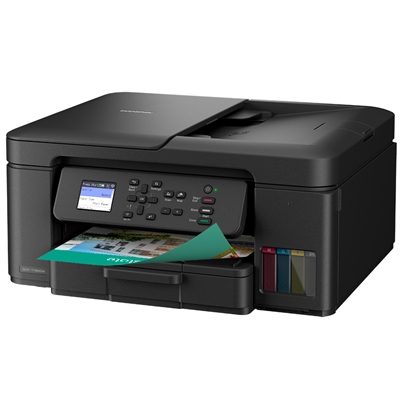
| Technology | Inkjet |
|---|
| Memory | 128MB |
|---|
| Control panel | 4.5cm (1.8 ) Colour display |
|---|
| Local Interface | Hi-Speed USB 2.0 |
|---|
| Wireless Network | 2.4GHz and 5GHz Support |
|---|
| Carton Contents | Device, Inbox Inks, Power Supply Cord, Quick Set-Up Guide, Warranty Card |
|---|
| 1-Sided | 17.0 ipm Mono and |
|---|
| 2-Sided | Yes |
|---|
| Quiet Mode | A mode to reduce the printing noise |
|---|
| Resolution | Up to 1200 x 2400dpi Mono and Colour |
|---|
| Windows | TWAIN and WIA Windows 11 (32 and 64 bit editions) |
|---|
| ChromeOS | Supports native ChromeOS scanning |
|---|
| Paper Input Standard Tray | 150 Sheets |
|---|
| Manual Feed Slot | LTR, Legal, Folio, Mexico Legal, India Legal, A4, A5, 10 x 15cm |
|---|
| Automatic Document Feeder (ADF) | 20 Sheets |
|---|
| Paper Output | 50 Sheets A4 |
|---|
| Standard Tray | A4, LTR, LGL, Folio, EXE, A5, A6, Photo (102 x 152mm), Indexcard, (127 x 203mm), Photo-2L, (127 x 178mm), C5 Envelope, Com-10, DL Envelope, Monarch, Mexico Legal, India Legal |
|---|
| ADF | Width: 139.7 – 215.9 mm, Length: 210.0 – 355.6 mm |
|---|
| Auto 2-Sided | A4 |
|---|
| Scanner Glass | Up to A4 / Letter |
|---|
| Scanner Type | CIS (Contact Image Sensor) |
|---|
| Colour and Mono Scanning | Yes |
|---|
| Scan Resolution from ADF | 600 x 600dpi |
|---|
| Scan Resolution from Scanner Glass | 1200 x 2400dpi |
|---|
| Interpolated Scan Resolution | Brother Scanner Utility enhances, up to 19,200 x 19,200dpi |
|---|
| Supported File Formats | PDF, JPEG, TIFF |
|---|
| Standard Functions | Scan to E-mail, Image and File |
|---|
| Scan Features | Auto Deskew from ADF only (iPrint Scan for Desktop) |
|---|
| MacOS | Scanning via MacOS requires the use of AirPrint. Mac drivers are not provided. |
|---|
| BRAdmin | LAN/WAN management software |
|---|
| Embedded Web Server | Web based print management software embedded onto the device |
|---|
| Status Monitor | Monitor the status of your machine from your computer |
|---|
| Brother iPrint Scan Desktop | Print from, scan to, preview copies and check the machine status from Windows or macOS PC |
|---|
| Easy Setup | Simple access to drivers and software for the installation of your Brother machine |
|---|
| Utilities | Provides setup guides, manual, FAQ, troubleshooting and contact to Brother customer service |
|---|
| 2.4GHz | IEEE 802.11 b/g/n (Infrastructure Mode), IEEE 802.11 g/n (Wi-Fi Direct) |
|---|
| 5GHz | IEEE 802.11 a/n (Infrastructure Mode), IEEE 802.11 a/n (Wi-Fi Direct) |
|---|
| Wi-Fi Direct | Print wirelessly without having to go through a wireless access point (both automatic and manual methods supported) |
|---|
| Wireless Setup Support | Wi-Fi Protected Setup (WPS) |
|---|
| Mobile | Print or scan from your mobile device with Brother Mobile Connect, Airprint, Mopria |
|---|
| Wireless Network Security | WEP 64/128bit, WPA-PSK (TKIP/AES), WPA2-PSK (TKIP/AES), WPA3-SAE (AES) |
|---|
| IPv6 | NDP, RA, mDNS,LLMNR Responder, DNS Resolver, LPR/LPD, Custom Raw Port/Port9100, IPP, SNMPv1/v2c, TFTP server, Web Services (Print/Scan), SNTP Client, ICMPv6, HTTP Server |
|---|
| Digitally-signed Firmware | The firmware for Brother print and scan devices is digitally signed and secure |
|---|
| Certificate Management | Use the default standard self-signed, create a custom self-signed certificate, certificate signing request (CSR), or external public cerificate private key for protected network communcation |
|---|
| Port-based Network | Access Control (IEEE 802.1x) Brother devices are in full compliance with this standard, to allow connection to an 802.1x EAP (Extensible Authentication Protocol) protected network |
|---|
| Restrict network protocol | The Protocol Control feature allows an administrator to restrict communication protocols (e.g. FTP, Telnet) as required |
|---|
| Cloud Secure Print | Enables password protected driverless print job release |
|---|
| IP Filter | Restrict which network users can or cannot access the device over the network (IPv4) |
|---|
| SecureBoot | The integrity of the firmware is checked before allowing any user interaction. Only genuine Brother firmware can be used |
|---|
| Firmware Updates | In addition to allowing automatic updates the printer can be set to not receive older firmware versions to avoid downgrade by an unauthorised user |
|---|
| Firmware Encryption | During update firmware is transferred over a trusted HTTPS encrypted connection |
|---|
| With Carton (WxDxH) | 463 x 260 x 496mm – 9.50kg |
|---|
| Without Carton (WxDxH) | 390 x 343 x 183mm – 7.90kg |
|---|
| Duty Cycle Recommended Monthly | Up to 1,000 pages |
|---|
| Power Requirement | 220 – 240V AC 50/60Hz |
|---|
| Humidity | 20 – 80% |
|---|
| Copying | 16W |
|---|
| Ready | 2.5W |
|---|
| Sleep | 0.6W |
|---|
| Power Off | 0.15W |
|---|
| Sound Pressure | PC Printing (Colour/Mono): Approx. 55.0dB(A) |
|---|
| Marca | BROTHER |
|---|



Recensioni
Ancora non ci sono recensioni.